AnalogDAW Tune
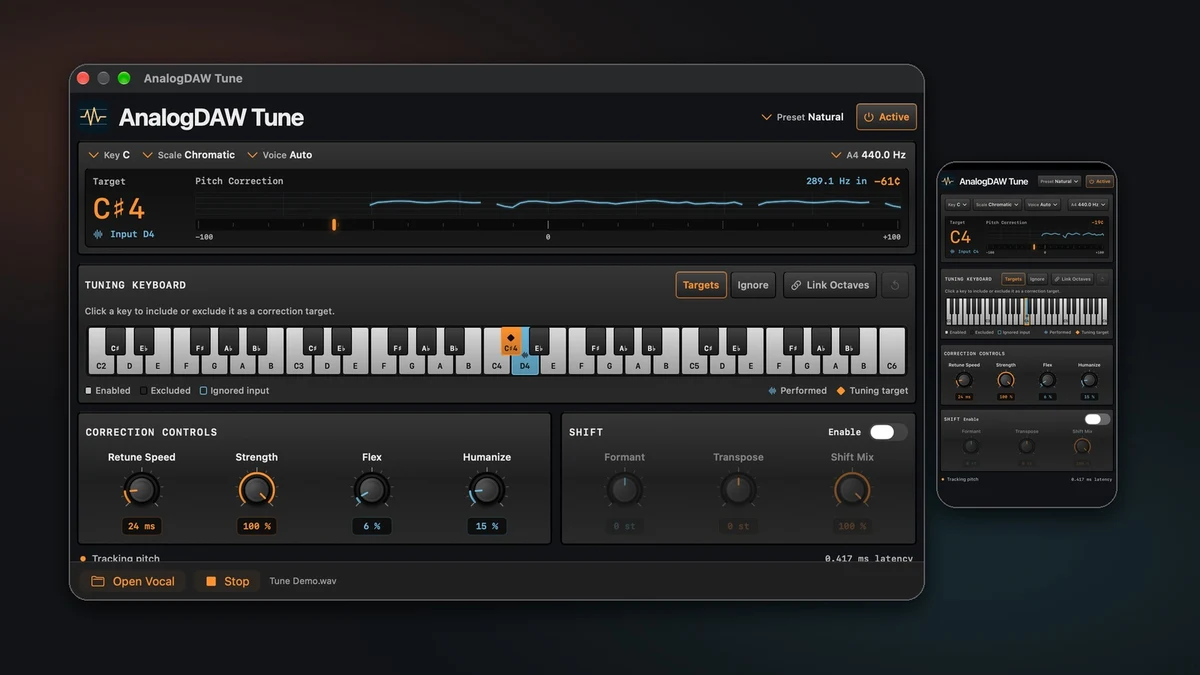
Real-time vocal pitch correction for Mac, iPad and iPhone. Use AnalogDAW Tune as an AUv3 audio effect in a compatible host, or open a local audio file in the included audition app.
Get started with AnalogDAW Tune
Hear the difference
Listen to the same phrase dry, with Natural correction, with edited targets, in Hard Tune, and with an octave layered in.
Keep the movement in the take
Choose Natural or Gentle for an isolated lead, or switch to Hard Tune for stepped transitions. Retune Speed, Strength, Flex and Humanize let you shape the correction around slides, vibrato and sustained notes. See the detected pitch and correction in cents as the track plays.
Pick the notes you want to tune

Start with the song's key and scale. Add or remove targets one octave at a time, or use Ignore to pass a sung note through dry. Link Octaves when the edit should apply across the whole keyboard.
Blend in an octave

Transpose the voice up or down an octave, move the formants independently, and blend the shifted voice with the tuned original. Use Octave Double as a starting point.
Explore pitch shift and presets
User guide
- Getting Started covers installation, compatible hosts and local file auditioning.
- Pitch Correction and Note Targets covers key, scales, retune behavior and octave-specific keyboard edits.
- Pitch Shift, Presets and Automation covers transpose, formants, preset recall and host automation.
- Support and Compatibility covers host discovery, pitch tracking, monitoring and playback.
Tune requires macOS 15 or later, or iOS/iPadOS 18 or later. Audio processing stays on your device. See the privacy policy.